
Nursery Order Management: Turning an 18-Column Spreadsheet into a Clear, Usable Tool
Internal Platform
SaaS
In Build
My Role
Product Designer (Lead/Sole)
Team
Product Manager, Business Analysts, and Engineering Team
Timeline
Ongoing · In build
TL;DR
As Sun World expands its citrus program, growers are placing more tree orders with partner nurseries. Previously, every order lived in a shared spreadsheet, while invoices were tracked separately in Business Central. As order volume grew, this manual process became unsustainable. To solve this, I designed a dedicated order management tool inside Seedling, Sun World’s internal platform, used by nursery operations, licensing admins and finance. By exploring multiple layout options with key stakeholders, we uncovered critical edge cases at high volume and refined the system into a clear, efficient design (which is now in development).
Context
The Problem
When a grower orders citrus trees, a partner nursery grows and ships them while Sun World handles invoicing. Tracking lived in a shared spreadsheet and invoices in Business Central, so teams reconciled the two by hand. As volume grew, that stopped working.
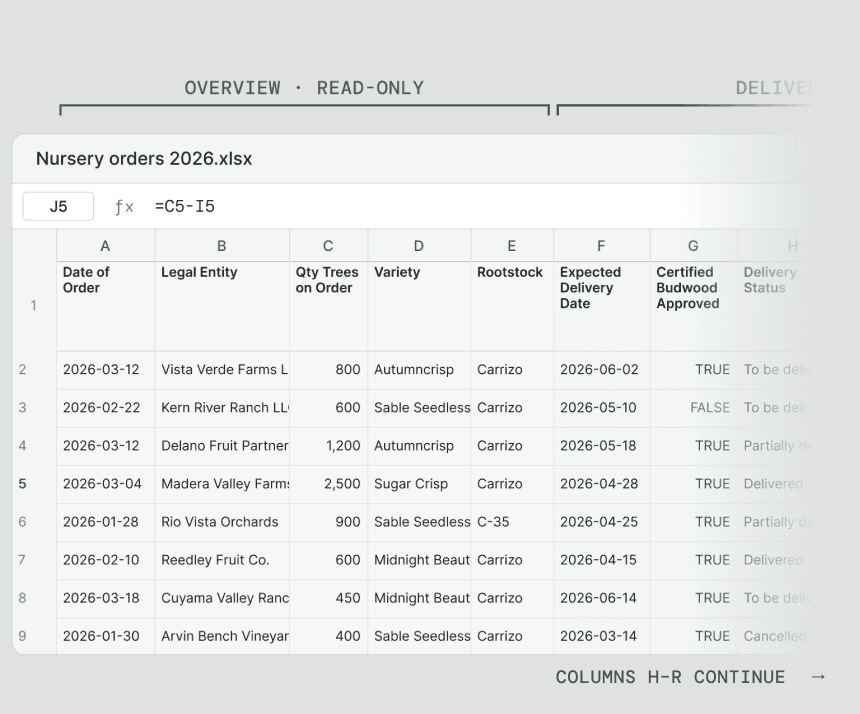
Orders are created automatically from each planting’s lease agreement, so the tool’s real job was keeping hundreds of orders moving and showing which ones needed a person. The BRD I received, though, mirrored the spreadsheet: 18 dense columns (A–R) of calculated fields, invoicing triggers and delivery statuses.
Discovery
Uncovering the Complexity Behind 18 Columns
Those 18 columns weren’t one table. They were five workflows bundled together:
Static vs. Dynamic Data: Columns A–E never change; F–R change daily. In a spreadsheet they looked identical, which invited accidental edits.
Time-Sensitive Actions: Invoices could only be triggered 30 days before delivery, so the interface had to say when, not just disable a button. Midway through, the BRD (v2.3) made invoicing automatic, and the design moved from a trigger button to clear status from Business Central (Unbilled, Open, Partially paid, Fully paid).
Role-Based Needs: Admins, nursery operations and finance each own different fields, and only admins finalize. Four roles, one screen, nobody overwhelmed.
Clear Status Communication: Plant Breeders’ Rights can block an approval. When budwood can’t be approved, the switch stays off and says why, instead of quietly graying out.
Split Deliveries: One planting can arrive across several shipments, so remaining trees are calculated (ordered minus delivered), never typed.

The original spreadsheet: 18 columns, A to R, grouped by the tab each one became
Process
Exploring Solutions
I explored five layout concepts, using AI-assisted prototyping to turn precise specs into structural options quickly and spend more time on the interactions.
I reviewed them with the Product Manager and Engineering Lead. Option 5, combining the best of options 2 and 3, became the path forward.

The five layout concepts, rough on purpose
Solution
Designing for Scale
Testing real layouts showed what high-volume days would feel like. The BRD sized the list for up to 1,000 orders per day, and its author spotted the risk: past a hundred active orders, the work that needed attention got buried under delivered ones. So I refocused the layout on what’s active:
Scoped Views: Delivered shows only the last 90 days; finalized orders move to Historical Orders, with advanced filtering for older records.
Alerts Bar: One row of counts filters to what needs attention: overdue, awaiting budding approval, invoice voided, ready to finalize.
Visual Flags: Delayed orders are flagged so they can’t slip by.
Key Metrics Banner: A summary tracks average fulfillment time and late deliveries.
Board and Table: The board works for a handful of orders; above 20, the page opens as a compact table, with the board one click away.
This direction was approved and is in development. Putting prototypes in stakeholders’ hands surfaced friction a requirements doc never could.
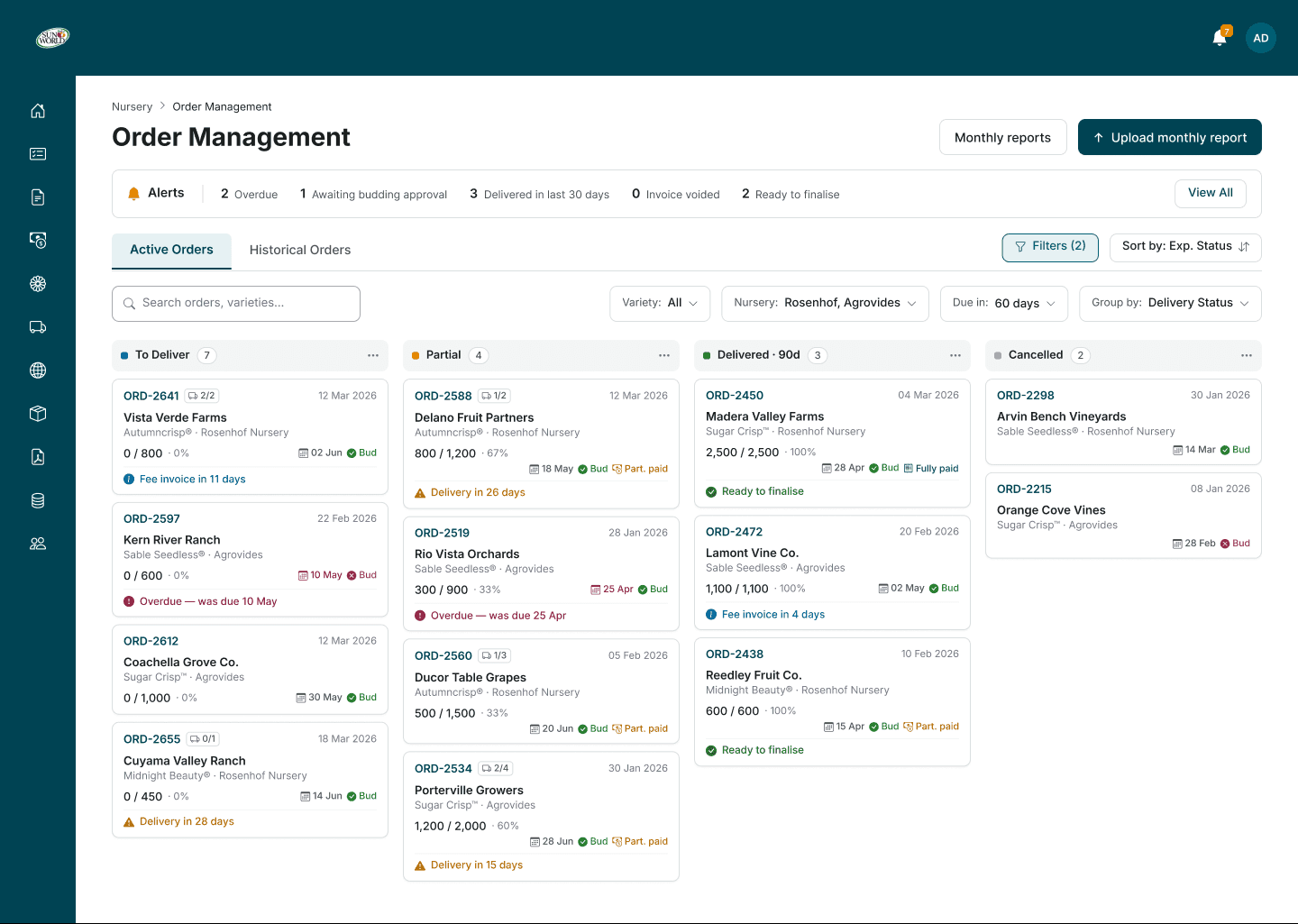
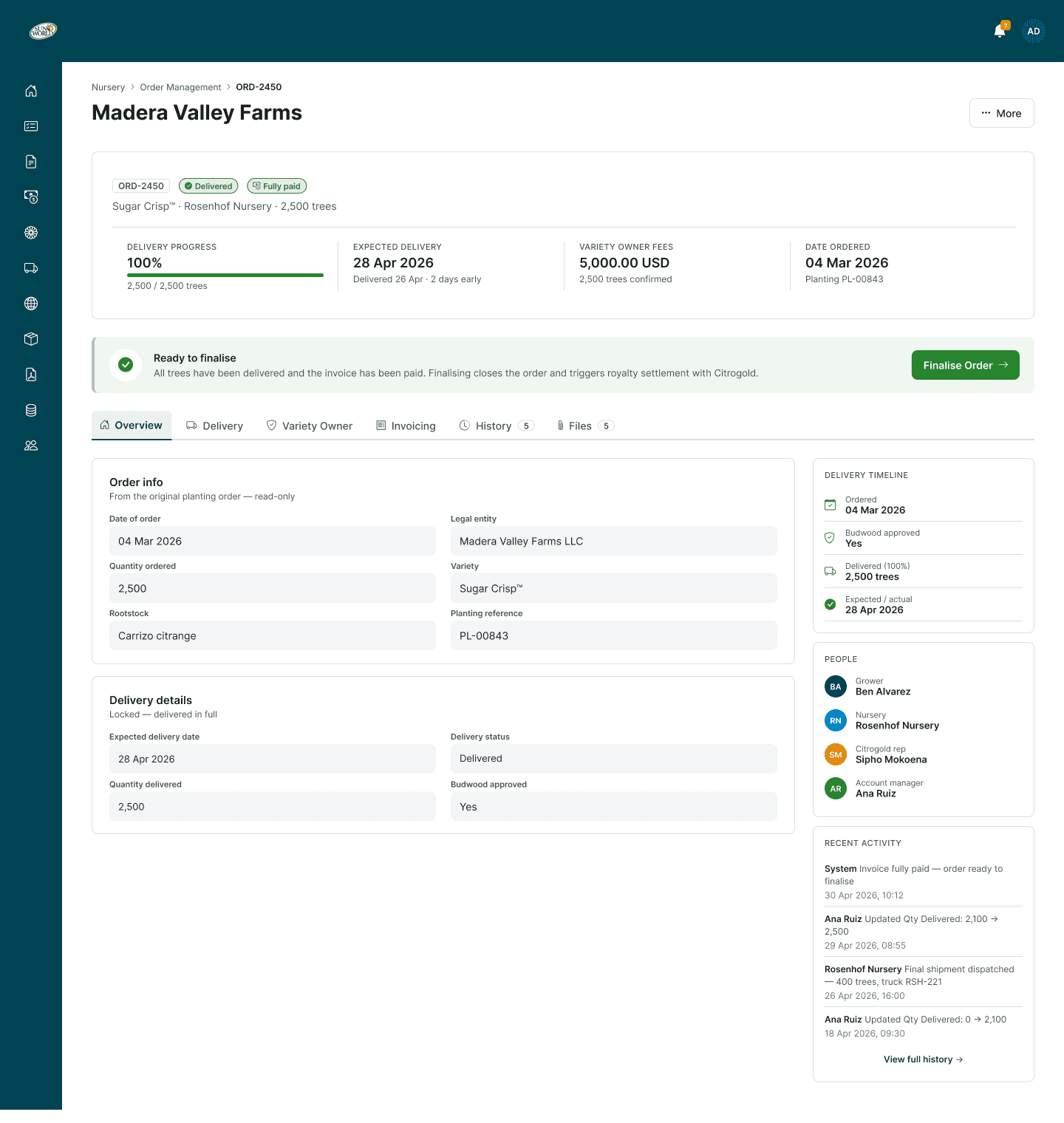
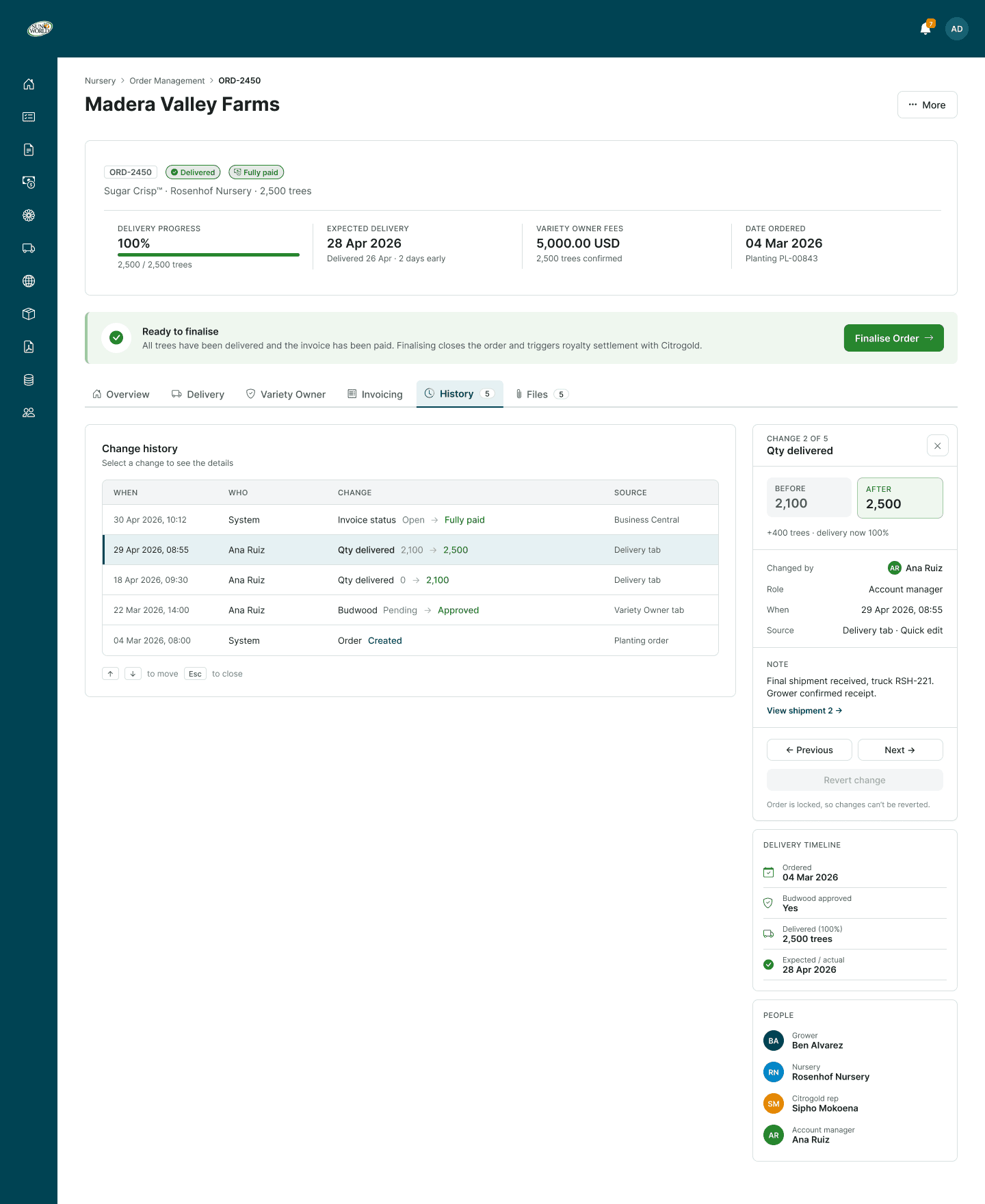
Three orders through the flow: overdue, partially paid, and ready to finalize
Updating Hundreds of Orders at Once
Nurseries send monthly reports covering every active order. I designed a bulk import: upload a spreadsheet or type into a grid, and each row matches its order by its Citrogold reference number.
Nothing changes until someone reviews it. The preview then sorts rows into updates, new orders and unchanged, flags problems like delivering more trees than ordered, and holds the batch until they’re fixed. Once confirmed, it shows what’s ready to finalize and which fee dates moved.

Monthly report preview: two rows need fixing before the batch can be confirmed
From Design to Engineering
Status indicators and validation banners became shared engineering components, built on the Seedling design system.
I also specified the behavior: delivery fields autosave, fully delivered orders lock except for comments, invoice status syncs from Business Central instead of being stored, and every sensitive change is logged with who made it, their role, and the before-and-after values.

Status states and the validation banner for blocked orders
Reflections
What I Learned
Prototypes generate actionable insights: Exploring multiple layout options helped test assumptions and surface practical edge cases early in the process.
Rapid iteration keeps momentum high: Leveraging AI prototyping tools reduced the turnaround time between feedback and revisions, keeping design discussions focused and moving quickly.
Curious to know more?
Want to hear more? I’m happy to chat more about my process over a call. Reach out to me at hello[dot]adidee[at]gmail[dot]com!
Next up
Quick Moves
Designing intuitive wayfinding for a virtual reality classroom, grounded in how people orient in space.
Nursery Order Management: Turning an 18-Column Spreadsheet into a Clear, Usable Tool
Internal Platform
SaaS
In Build
My Role
Product Designer (Lead/Sole)
Team
Product Manager, Business Analysts, and Engineering Team
Timeline
Ongoing · In build
TL;DR
As Sun World expands its citrus program, growers are placing more tree orders with partner nurseries. Previously, every order lived in a shared spreadsheet, while invoices were tracked separately in Business Central. As order volume grew, this manual process became unsustainable. To solve this, I designed a dedicated order management tool inside Seedling, Sun World’s internal platform, used by nursery operations, licensing admins and finance. By exploring multiple layout options with key stakeholders, we uncovered critical edge cases at high volume and refined the system into a clear, efficient design (which is now in development).
Context
The Problem
When a grower orders citrus trees, a partner nursery grows and ships them while Sun World handles invoicing. Tracking lived in a shared spreadsheet and invoices in Business Central, so teams reconciled the two by hand. As volume grew, that stopped working.
Orders are created automatically from each planting’s lease agreement, so the tool’s real job was keeping hundreds of orders moving and showing which ones needed a person. The BRD I received, though, mirrored the spreadsheet: 18 dense columns (A–R) of calculated fields, invoicing triggers and delivery statuses.
Discovery
Uncovering the Complexity Behind 18 Columns
Those 18 columns weren’t one table. They were five workflows bundled together:
Static vs. Dynamic Data: Columns A–E never change; F–R change daily. In a spreadsheet they looked identical, which invited accidental edits.
Time-Sensitive Actions: Invoices could only be triggered 30 days before delivery, so the interface had to say when, not just disable a button. Midway through, the BRD (v2.3) made invoicing automatic, and the design moved from a trigger button to clear status from Business Central (Unbilled, Open, Partially paid, Fully paid).
Role-Based Needs: Admins, nursery operations and finance each own different fields, and only admins finalize. Four roles, one screen, nobody overwhelmed.
Clear Status Communication: Plant Breeders’ Rights can block an approval. When budwood can’t be approved, the switch stays off and says why, instead of quietly graying out.
Split Deliveries: One planting can arrive across several shipments, so remaining trees are calculated (ordered minus delivered), never typed.
The original spreadsheet: 18 columns, A to R, grouped by the tab each one became
Process
Exploring Solutions
I explored five layout concepts, using AI-assisted prototyping to turn precise specs into structural options quickly and spend more time on the interactions.
I reviewed them with the Product Manager and Engineering Lead. Option 5, combining the best of options 2 and 3, became the path forward.
The five layout concepts, rough on purpose
Solution
Designing for Scale
Testing real layouts showed what high-volume days would feel like. The BRD sized the list for up to 1,000 orders per day, and its author spotted the risk: past a hundred active orders, the work that needed attention got buried under delivered ones. So I refocused the layout on what’s active:
Scoped Views: Delivered shows only the last 90 days; finalized orders move to Historical Orders, with advanced filtering for older records.
Alerts Bar: One row of counts filters to what needs attention: overdue, awaiting budding approval, invoice voided, ready to finalize.
Visual Flags: Delayed orders are flagged so they can’t slip by.
Key Metrics Banner: A summary tracks average fulfillment time and late deliveries.
Board and Table: The board works for a handful of orders; above 20, the page opens as a compact table, with the board one click away.
This direction was approved and is in development. Putting prototypes in stakeholders’ hands surfaced friction a requirements doc never could.
Three orders through the flow: overdue, partially paid, and ready to finalize
Updating Hundreds of Orders at Once
Nurseries send monthly reports covering every active order. I designed a bulk import: upload a spreadsheet or type into a grid, and each row matches its order by its Citrogold reference number.
Nothing changes until someone reviews it. The preview then sorts rows into updates, new orders and unchanged, flags problems like delivering more trees than ordered, and holds the batch until they’re fixed. Once confirmed, it shows what’s ready to finalize and which fee dates moved.
Monthly report preview: two rows need fixing before the batch can be confirmed
From Design to Engineering
Status indicators and validation banners became shared engineering components, built on the Seedling design system.
I also specified the behavior: delivery fields autosave, fully delivered orders lock except for comments, invoice status syncs from Business Central instead of being stored, and every sensitive change is logged with who made it, their role, and the before-and-after values.
Status states and the validation banner for blocked orders
Reflections
What I Learned
Prototypes generate actionable insights: Exploring multiple layout options helped test assumptions and surface practical edge cases early in the process.
Rapid iteration keeps momentum high: Leveraging AI prototyping tools reduced the turnaround time between feedback and revisions, keeping design discussions focused and moving quickly.
Curious to know more?
Want to hear more? I’m happy to chat more about my process over a call. Reach out to me at hello[dot]adidee[at]gmail[dot]com!
Next up
Quick Moves
Designing intuitive wayfinding for a virtual reality classroom, grounded in how people orient in space.
Nursery Order Management: Turning an 18-Column Spreadsheet into a Clear, Usable Tool
Internal Platform
SaaS
In Build
My Role
Product Designer (Lead/Sole)
Team
Product Manager, Business Analysts, and Engineering Team
Timeline
Ongoing · In build
TL;DR
As Sun World expands its citrus program, growers are placing more tree orders with partner nurseries. Previously, every order lived in a shared spreadsheet, while invoices were tracked separately in Business Central. As order volume grew, this manual process became unsustainable. To solve this, I designed a dedicated order management tool inside Seedling, Sun World’s internal platform, used by nursery operations, licensing admins and finance. By exploring multiple layout options with key stakeholders, we uncovered critical edge cases at high volume and refined the system into a clear, efficient design (which is now in development).
Context
The Problem
When a grower orders citrus trees, a partner nursery grows and ships them while Sun World handles invoicing. Tracking lived in a shared spreadsheet and invoices in Business Central, so teams reconciled the two by hand. As volume grew, that stopped working.
Orders are created automatically from each planting’s lease agreement, so the tool’s real job was keeping hundreds of orders moving and showing which ones needed a person. The BRD I received, though, mirrored the spreadsheet: 18 dense columns (A–R) of calculated fields, invoicing triggers and delivery statuses.
Discovery
Uncovering the Complexity Behind 18 Columns
Those 18 columns weren’t one table. They were five workflows bundled together:
Static vs. Dynamic Data: Columns A–E never change; F–R change daily. In a spreadsheet they looked identical, which invited accidental edits.
Time-Sensitive Actions: Invoices could only be triggered 30 days before delivery, so the interface had to say when, not just disable a button. Midway through, the BRD (v2.3) made invoicing automatic, and the design moved from a trigger button to clear status from Business Central (Unbilled, Open, Partially paid, Fully paid).
Role-Based Needs: Admins, nursery operations and finance each own different fields, and only admins finalize. Four roles, one screen, nobody overwhelmed.
Clear Status Communication: Plant Breeders’ Rights can block an approval. When budwood can’t be approved, the switch stays off and says why, instead of quietly graying out.
Split Deliveries: One planting can arrive across several shipments, so remaining trees are calculated (ordered minus delivered), never typed.
The original spreadsheet: 18 columns, A to R, grouped by the tab each one became
Process
Exploring Solutions
I explored five layout concepts, using AI-assisted prototyping to turn precise specs into structural options quickly and spend more time on the interactions.
I reviewed them with the Product Manager and Engineering Lead. Option 5, combining the best of options 2 and 3, became the path forward.

The five layout concepts, rough on purpose
Solution
Designing for Scale
Testing real layouts showed what high-volume days would feel like. The BRD sized the list for up to 1,000 orders per day, and its author spotted the risk: past a hundred active orders, the work that needed attention got buried under delivered ones. So I refocused the layout on what’s active:
Scoped Views: Delivered shows only the last 90 days; finalized orders move to Historical Orders, with advanced filtering for older records.
Alerts Bar: One row of counts filters to what needs attention: overdue, awaiting budding approval, invoice voided, ready to finalize.
Visual Flags: Delayed orders are flagged so they can’t slip by.
Key Metrics Banner: A summary tracks average fulfillment time and late deliveries.
Board and Table: The board works for a handful of orders; above 20, the page opens as a compact table, with the board one click away.
This direction was approved and is in development. Putting prototypes in stakeholders’ hands surfaced friction a requirements doc never could.
Three orders through the flow: overdue, partially paid, and ready to finalize
Updating Hundreds of Orders at Once
Nurseries send monthly reports covering every active order. I designed a bulk import: upload a spreadsheet or type into a grid, and each row matches its order by its Citrogold reference number.
Nothing changes until someone reviews it. The preview then sorts rows into updates, new orders and unchanged, flags problems like delivering more trees than ordered, and holds the batch until they’re fixed. Once confirmed, it shows what’s ready to finalize and which fee dates moved.

Monthly report preview: two rows need fixing before the batch can be confirmed
From Design to Engineering
Status indicators and validation banners became shared engineering components, built on the Seedling design system.
I also specified the behavior: delivery fields autosave, fully delivered orders lock except for comments, invoice status syncs from Business Central instead of being stored, and every sensitive change is logged with who made it, their role, and the before-and-after values.

Status states and the validation banner for blocked orders
Reflections
What I Learned
Prototypes generate actionable insights: Exploring multiple layout options helped test assumptions and surface practical edge cases early in the process.
Rapid iteration keeps momentum high: Leveraging AI prototyping tools reduced the turnaround time between feedback and revisions, keeping design discussions focused and moving quickly.
Curious to know more?
Want to hear more? I’m happy to chat more about my process over a call. Reach out to me at hello[dot]adidee[at]gmail[dot]com!
Next up
Quick Moves
Designing intuitive wayfinding for a virtual reality classroom, grounded in how people orient in space.